
Most small businesses already have someone using ChatGPT. Very few have changed how the work actually gets done. That gap is what this guide is about.
This is a practical guide to AI for small business owners and operators with roughly 2 to 250 people. It is not a ranking of 27 tools, and it is not an enterprise transformation plan. It shows you how to implement AI in your business one job at a time: pick the job, automate it in 90 days, and prove whether it worked. The roadmap works the same in 2026 and 2027. Statistics and prices are dated so you can see how current they are.
Key takeaways
- Only about 1 in 5 U.S. businesses used AI in any business function in a given two-week period, according to Census data. The 58% to 77% figures in owner surveys count any use, including occasional chatbot use. Plan for the first number, not the second.
- Start with one high-volume, low-risk job, such as a daily brand and competitor watch, a weekly report, or first drafts of emails. Don’t start with a company-wide chatbot.
- A starter setup costs about $60 to $100 a month at today’s list prices: two or three AI assistant seats plus one automation tool, before any Microsoft 365 Copilot add-on.
- Run a 90-day roadmap with a kill date. Choose one workflow and one owner, write the success threshold down before you start, and decide in writing on day 90: scale, pivot, or sunset.
- Measure hours returned, cost per task, error rate, and turnaround time. Treat revenue gains as a possible later effect, not the business case.
Your first week: a checklist
- List ten repetitive tasks and time each one for a real week.
- Score them with the five-signal scorecard and pick the top one.
- Name one owner for it: the person whose week gets better.
- Turn on the AI already included in the software you pay for, and buy one AI assistant seat for that owner.
- Write the one-page workflow spec, including what success looks like on day 90.
- Share the one-page AI policy with your team before anyone pastes customer data into a chatbot.
How can AI help a small business?
For most small businesses, AI helps by doing the first draft, the first sort, or the first pull of data on repetitive work, so a person only has to review it. It rarely means training your own AI model. It almost always means connecting tools you already pay for to an AI model, with a person checking the output and a before-and-after number you can measure.
The jobs where that pays off first:
| Job | What AI does | Playbook |
|---|---|---|
| Keeping an eye on competitors and mentions | Collects, removes duplicates, summarizes | Data capture |
| Emails, product pages, social posts, ads | Drafts and makes variations from your brief | Marketing content |
| Google and Meta ads | Research, ad variations, pre-launch checks | Paid advertising |
| New leads and missed calls | Drafts the first reply, scores the lead, books the time | Sales and lead intake |
| Routine customer questions | Drafts answers from your written policies | Customer service |
| The weekly numbers report | Restates the numbers and flags big changes | Reporting |
| Invoices | Reads them and fills in the fields for approval | Finance |
| “Where’s that file?” | Answers from your documents, with a citation | Internal knowledge |
If nobody can name the workflow, the owner, and the number that should improve, you have bought software. You have not implemented AI.
How many small businesses use AI? (2026 data)
You will see headlines saying 77% of small businesses use AI, and others saying fewer than 20%. Both can be true, because they count different things.
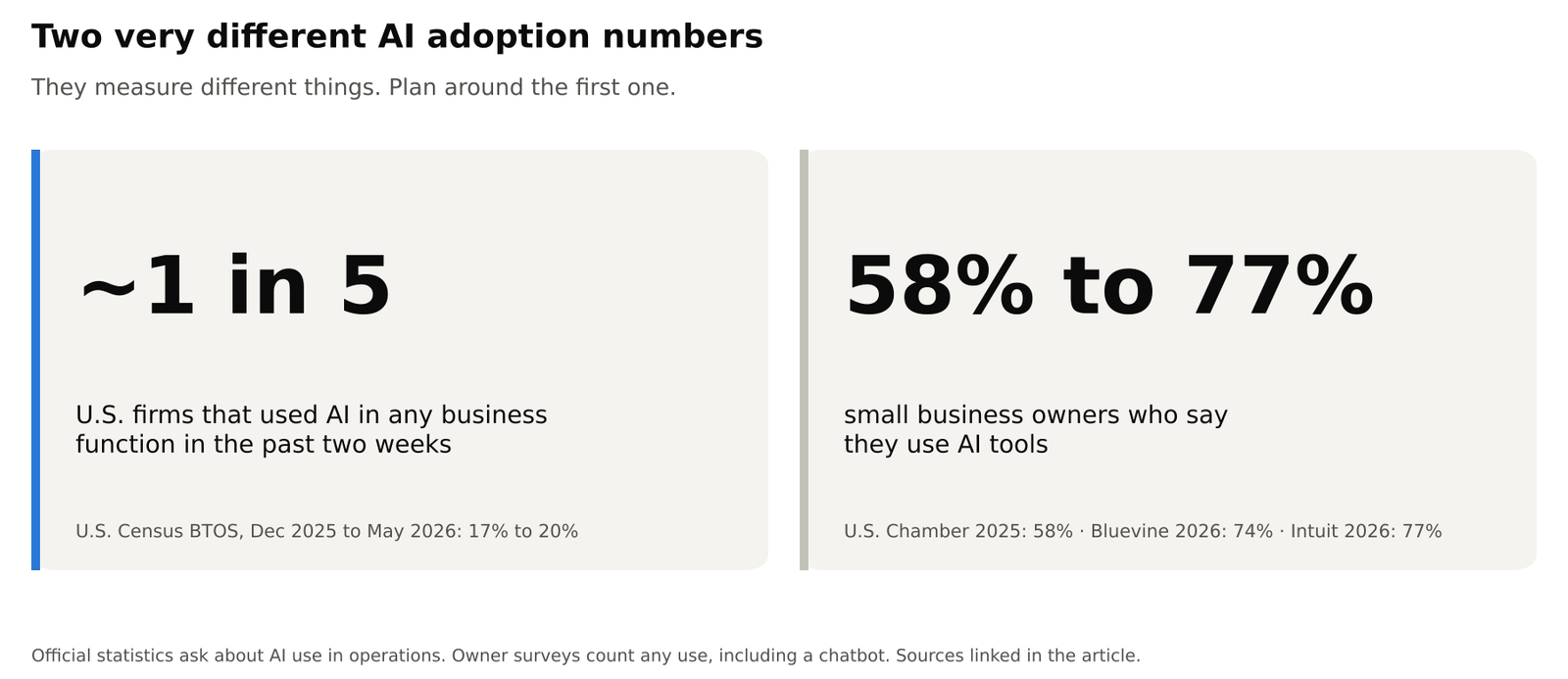
- Official data asks whether the business used AI in any function. The Census Bureau’s Business Trends and Outlook Survey found 17% to 20% of U.S. firms used AI in any business function in the past two weeks, from December 2025 to May 2026. In the EU, 20% of firms with 10 or more employees used AI in 2025, per Eurostat.
- Owner surveys count any use, including a chatbot. The U.S. Chamber of Commerce found 58% of small businesses using generative AI in 2025. Bluevine found 74% of SMB owners using or testing AI tools, and Intuit puts regular use at 77%.
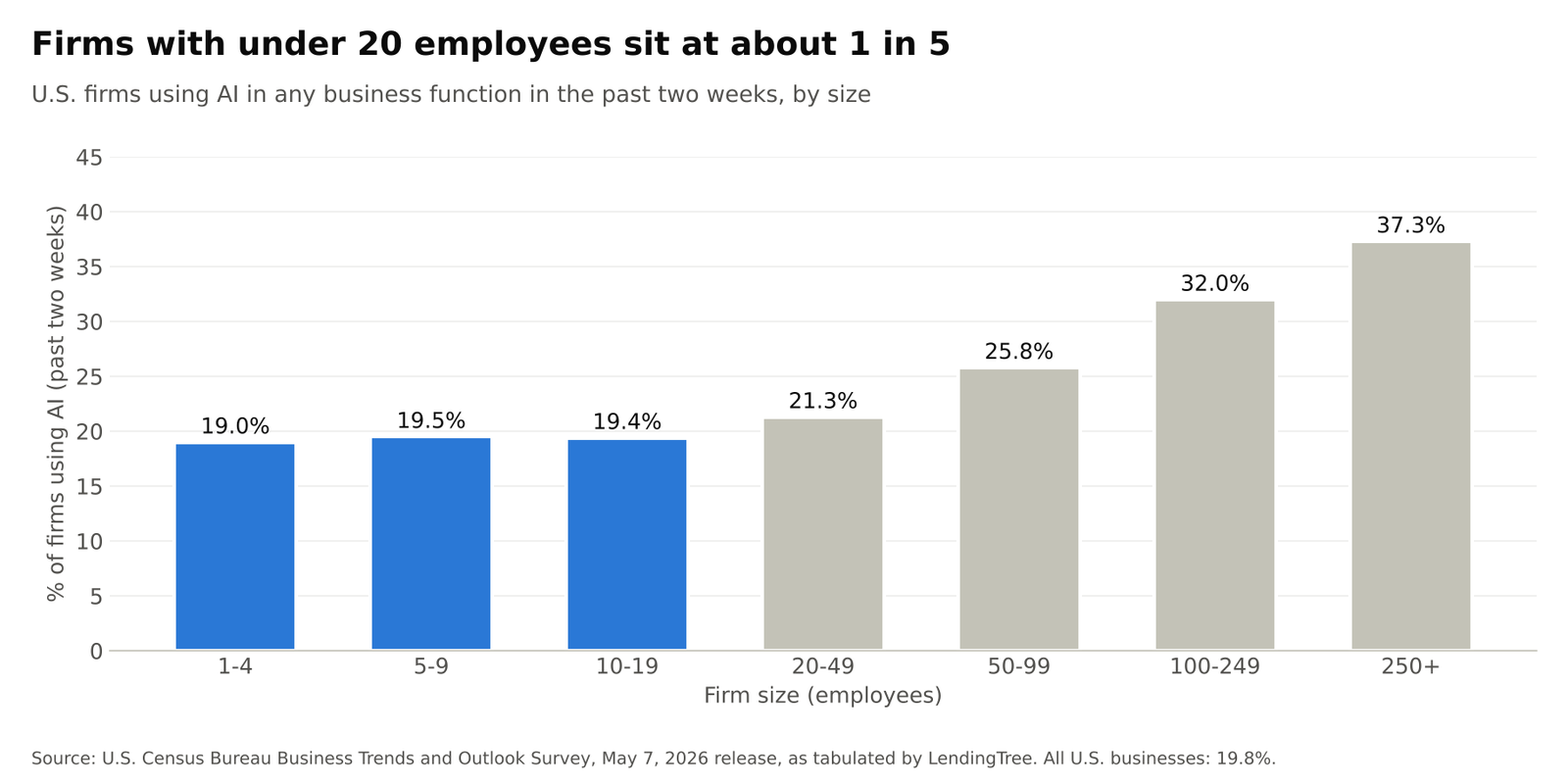
What this means for you: if you think 77% of your competitors have rebuilt their operations around AI, you will panic-buy a platform. If you know the official rate for firms your size is about 1 in 5 (LendingTree’s tabulation of the Census data), you will pick one job and ship it. You are not behind. You are early, if you do it properly.
From my client work
People who live in a chatbot all day will swear the business runs on AI. Then you look at Monday’s report and it’s still an export, a dashboard, and a person pasting screenshots into slides. The businesses that actually gained capacity killed that routine and replaced it with: pull the data automatically, draft the summary, have a human edit, send. On heavy accounts (Google Analytics, ads, SEO, and paid search files with a million-plus rows), that pipeline cut analysis from days to minutes. The chatbot tab did not.
What should you automate with AI first?
Automate the job that happens most often, follows the same pattern most of the time, and does little damage if it goes wrong. Don’t start with the AI model. Start with the work. Score each candidate from 1 to 5 on five signals:
| Signal | 1 point | 5 points |
|---|---|---|
| Volume | Happens monthly | Happens daily, or many times a day |
| Repeatability | Every case is a special case | 80% of cases follow the same pattern |
| Data already exists | Would need a new system | Already lives in a tool you can export from or connect to |
| Cost of a mistake | Hits a customer, cash, or compliance | Someone redoes a draft |
| Owner | “The team” | A named person whose week gets better |
How to read the score: 18 or more out of 25 is a good first project. If “cost of a mistake” scores 1 or 2, it isn’t a first project, whatever the total.
Example scores:
| Candidate | Volume | Repeatable | Data exists | Cost of mistake | Owner | Total |
|---|---|---|---|---|---|---|
| Daily competitor and mention watch | 5 | 4 | 5 | 5 | 4 | 23. Start here. |
| Weekly marketing report | 3 | 5 | 4 | 4 | 5 | 21. Good. |
| Chatbot answering billing questions | 4 | 3 | 2 | 1 | 2 | 12. Not yet. |
Illustrative scores. Score your own tasks with your own team.
Good first projects: a daily brand and competitor watch, first drafts of emails and proposals, sorting the inbox, meeting notes, a weekly report built from data you already export, replies to online reviews, pulling data off invoices (with a person approving), and scoring new leads against a written checklist.
Bad first projects: anything that changes a price, makes a legal or medical claim, or touches a customer’s money without a person in the loop. A company-wide chatbot with no documents behind it. Fully automated sales outreach. Forecasting before you trust your spreadsheet. Replacing the one person who holds the client relationship.
Find your starting point
| Business type | Where to start | What to measure |
|---|---|---|
| Local services (trades, salons, clinics) | Missed-call text back, booking reminders, review replies | Booked jobs and no-shows |
| Ecommerce and DTC brands | Product description backlog, support reply templates, review replies, email variations, ad creative supply | Hours per product and test results, not output counts |
| Professional services (law, accounting, consulting) | First pass on documents, intake, proposal drafts from a template, a knowledge assistant over past work | Turnaround time. Keep a licensed professional on everything that goes out. |
| Multi-location businesses | Local page content with locked name, address, and claims; review responses; shift-report summaries | Consistency, not volume |
| In-house marketing team of 2 to 8 | Voice card, variation factory, weekly reporting pipeline | Variations shipped and hours returned to work only a person can do |
| Agencies | Data capture, then reporting, then ad variation supply. Client-facing production only after the internal workflow is logged. | Hours returned per account |
From my client work
In my client work, the highest-scoring work is almost never “generate the campaign idea.” It’s the assembly line around the idea: monitoring, sorting search terms, ad variations, tagging, reporting, quality checks. Creative judgment comes later, once the assembly line runs on its own. The rule I use: don’t automate a job that doesn’t move a meaningful number of hours or dollars. If it’s rare, political, or a once-a-quarter exception, leave it to a person.
Which AI tools should a small business start with?
Start with the AI inside software you already pay for, add one AI assistant, and add one automation tool. That’s it. For a small business, implementing AI almost never means training a model. It’s one of four moves, in order of rising cost and commitment:
| Layer | Examples | Typical monthly cost | When it fits |
|---|---|---|---|
| AI inside tools you already pay for | Microsoft 365 Copilot, Gemini in Google Workspace, HubSpot, QuickBooks, Canva, the ad platforms’ built-in automation | Often included; Microsoft 365 Copilot Business starts at about $18 to $25 per user | Month one. Low cost, low disruption. |
| One standalone AI assistant | Claude Team (our pick for most small businesses) or ChatGPT Business. Pick one, not both. | About $20 to $25 per user | Drafts, research, first-pass analysis |
| Automation tool plus AI | Zapier, Make, or n8n connecting your apps to an AI model | From about $20, plus AI usage fees | In my experience, where most of the time savings show up |
| AI assistant that answers from your documents | Answers questions from your own files, with a citation, or doesn’t answer | Varies widely with setup | After one or two workflow wins |
Which AI assistant should you pick?
- If your business runs on Microsoft 365, start with Copilot, which already works inside Outlook, Word, Excel, and Teams.
- If it runs on Google Workspace, start with the Gemini features in your plan.
- If you need one standalone assistant, I recommend Claude for most small businesses. In my client work, it’s the stronger long-document writer, which covers much of what small businesses need AI for: proposals, reports, policies, and drafts built from your own files. If your team already lives in ChatGPT and its app connections, ChatGPT Business is a reasonable alternative. Either way, pick one until you have a reason for a second.
Buy this first:
- One AI assistant on a business plan for the person who owns your first workflow.
- One automation tool. Zapier or Make to start, n8n if you want tighter cost control or to host it yourself. Not two.
- Canva or Adobe, only if someone already makes your graphics. An image generator without your brand kit is how every business starts to look the same.
Don’t buy this first: an “AI employee” suite, a voice agent you can’t measure against missed calls, a second CRM, or anything whose pitch is that it put a dashboard on top of ChatGPT.
Do you need AI agents? An AI agent is an AI model that takes a series of steps on its own, such as reading an email, looking up the customer, and drafting a reply. For a small business, agents make sense once a workflow is already logged and boring, not as a starting point. Setting up a few task-specific agents is easier than most owners think. The hard part is designing the review step and getting your data in order, not picking the model.
One warning about “the latest model.” The newest AI model isn’t automatically the right one for your business. New models often cost more, have more restrictions, and keep changing. For a workflow that customers depend on, stability and a model that’s good at that specific task beat the launch headline.
How much does AI cost a small business?
Most small businesses can start with AI for about $60 to $100 a month at today’s list prices, before any Microsoft 365 Copilot add-on. Here’s what that looks like for a first workflow:
| Item | List price (October 2026) |
|---|---|
| 2 to 3 AI assistant seats (Claude Team or ChatGPT Business) | About $40 to $75 a month: $20 per seat for Claude Team or ChatGPT Business billed annually, $25 billed monthly |
| Zapier Professional | From $19.99 a month |
| AI already in Microsoft 365 or Google Workspace | Included in many plans; Microsoft 365 Copilot Business starts at $18 per user a month billed yearly ($25.20 monthly) |
| Starter total | About $60 to $100 a month, before usage-based AI fees and any Copilot add-on |
Prices change often. Check the vendor’s pricing page before you buy.
Costs grow with more seats, usage-based AI fees, and outside help. The AWS small business AI playbook suggests sizing a 6- to 8-week pilot in three cost buckets: licenses and usage, setup and integration, and training and quality checks. To see whether the spend pays off, use the ROI math below.
Should you hire an AI consultant?
Do it yourself if your first workflow uses tools that already connect to each other and someone can give it three to four hours a week. Hire help if it touches customers, money, or sensitive data, or if nobody inside has the time.
| Do it yourself if… | Hire an AI consultant if… |
|---|---|
| The workflow is internal (summaries, drafts, reports) | The workflow sends anything to customers on its own |
| Your tools have ready-made connections in Zapier or Make | Your systems don’t connect without custom work |
| One person can own it a few hours a week | Nobody has the time, or you need it live within weeks |
| No regulated or sensitive data is involved | It touches health, financial, legal, or HR data |
What builds cost: DK Studio, an agency that builds small-business automations, quotes $5,000 to $25,000 for a batch of 3 to 8 workflows, with most going live in 2 to 6 weeks. Monthly tool and usage costs come on top.
Before you sign, check that the proposal:
- Names the specific workflow and the number it should improve on page one. A six-figure “AI transformation” proposal that doesn’t is a sales deck, not a plan.
- Has a fixed scope and a review step where a person approves outputs.
- Logs every run, so you can see what the AI did.
- Leaves the accounts in your name and includes training for whoever takes it over.
AI automation for small business: 8 playbooks
Each playbook is a build, not a list of prompts.
| Playbook | Time to a working version | Risk if it goes wrong | First number to track |
|---|---|---|---|
| Data capture | 1 to 2 weeks | Low | Hours of manual scanning per week |
| Marketing content | About 2 weeks | Medium | Hours per piece, and how much a person rewrites |
| Paid advertising | 2 to 4 weeks | Medium | Time from brief to first testable ads |
| Sales and lead intake | 2 to 4 weeks | Medium | Minutes to first reply |
| Customer service | 3 to 6 weeks | High | Wrong-answer rate |
| Reporting and analytics | 2 to 4 weeks | Low to medium | Hours to produce the weekly report |
| Finance and back office | 4 to 6 weeks | High | Invoices processed without correction |
| Internal knowledge and hiring | 2 to 4 weeks | Medium | Questions answered with a cited source |
Build times are planning estimates from my client work, not benchmarks.
1. Data capture: automate your morning scan
What it is: the morning scan of brand and name mentions, competitor pages, industry news, and relevant posts. For most businesses, this is the best first project: a wrong summary costs less than a wrong invoice, and your team learns what supervised AI feels like.
Who it fits: any business that currently asks someone to “keep an eye on things.” Knowing what changed is half the battle, and when that one person is out, the watch usually goes dark.
How to build it:
- List the names, websites, and topics to watch. Ten is enough.
- Schedule the collection: alerts, a website change monitor, and a social media watch if your industry talks there (for X, Grok or an equivalent watch works).
- Remove duplicates and tag each item by topic. Sentiment tagging (positive or negative) is optional and often wrong.
- Send a short summary to wherever the team already looks: email, Slack, or Teams.
- A person marks what matters. Those marks teach the system what to prioritize next week.
Starter recipe (one way to build it):
| Step | Tool example |
|---|---|
| Watch names and topics | Google Alerts, delivered as an RSS feed |
| Watch competitor pages | A website change monitor such as Visualping |
| Collect once a day | A scheduled Zap in Zapier (or a Make scenario) |
| Remove duplicates, tag, summarize | An AI step in the same Zap, using Claude (or ChatGPT) |
| Deliver | A message to a Slack or Teams channel, or an email |
Planning estimate: a first version in an afternoon to a day, then a few weeks of tuning what counts as “important.”
What good looks like: hours of scanning become minutes of reading. Misses are easy to spot, because the summary lists its sources. Coverage no longer stops when one person is out.
How it fails: a firehose with no tags. A summary nobody opens. A watch that pulls in client data it shouldn’t.
2. Marketing content: drafts and variations from a clear brief
What it is: drafting copy and images, plus multiple versions of each, when you already know what you want to say: product pages, emails, social posts, ads, landing-page sections.
Who it fits: any business that needs to publish more than its people can write. The SBA Office of Advocacy found marketing automation is especially common among small businesses.
How to build it (about two weeks):
- Write a one-page voice card: who you’re talking to, promises you can make, words you never use, three good examples, and three examples of what not to write.
- Put the voice card, your offer details, and your ten best-performing pieces into a project in your AI assistant.
- Ask for packages, not one-off prompts. Example: five ad texts, five headlines, five descriptions, a 15-second video script, and image descriptions for accessibility.
- A person edits against a checklist: are the claims accurate, is it on-brand, is it legally safe, is the offer right, does it follow the platform’s ad rules?
- After two weeks, save the winners and the losers. The losers are more valuable, because they show the AI what not to write.
Tools: the AI assistant you already picked. An image generator a designer supervises. The built-in AI in Klaviyo, Mailchimp, or HubSpot if you already use them. Canva or Adobe for layout.
What good looks like: fewer hours per piece, more testable versions shipped each week, less rewriting by people, and AI-assisted versions performing as well as or better than human-only versions. “We posted more” is not a result.
Real-world examples:
- Ministry of Supply, an apparel brand, used Klaviyo’s predicted-gender segmentation, plus preferences customers gave in website pop-ups, to send two tailored versions of each weekly email and reported 47.3% year-over-year growth in campaign revenue. The lever was better targeting, not fancier writing.
- FULLBEAUTY Brands reported 45% higher return on ad spend (ROAS), a 22% higher conversion rate, and a 36% higher click-through rate after replacing plain white product backgrounds with AI-generated scenes, per a Hookd case-study roundup. Treat it as vendor-reported.
- Monolith KLH, a Paris-based media agency of about 40 people, went from 8 to 12 ad variations per client per month to 40 to 60. Brief-to-creative time dropped from 5 to 7 business days to under 24 hours, freeing 25 to 30 hours a week for strategy.
How it fails: claims nobody checked. Ads so similar that the ad platform can’t learn what works. A voice that sounds like every other business using the same AI.
From my client work
Once AI agents are trained on the industry, the client, and the live campaign, most of the assembly line can run on its own: grouping keywords, outlining content briefs, drafting page titles and descriptions, producing ad variations. A person still signs off at every major step. I never let AI publish, on its own, a claim about why rankings changed, anything touching health, financial, or legal advice, changes to how Google indexes the site, or live page titles and descriptions. People still own the brief, the claim, and the decision to say “we’re not running that.”
3. Paid advertising: AI for Google Ads and Meta
What it is: research, briefs, ad volume, pre-launch checks, mid-campaign notes, and the weekly summary. For many advertisers, Google’s and Meta’s own automation (Performance Max and Advantage+) already decides much of where the money goes. Your advantage is everything around those systems.
How to build it:
- Supervised research: competitor ads, the public ad libraries, competitor landing pages. A person marks each idea “steal,” “ignore,” or “watch.”
- A brief template: audience, the job the customer is hiring you for, offer, proof, constraints, required phrases, banned phrases, ad formats.
- A variation factory that works from an approved brief. Cap the number. Unlimited variations bury whoever has to review them.
- Pre-launch checks the AI can run: character limits, missing tracking tags on links (UTM parameters), claims that don’t match the landing page, wording the platform prohibits.
- Mid-campaign notes, not mid-campaign autopilot. A weekly job flags ads that are wearing out and drafts a recommendation: kill, adjust, or scale. A person makes the call.
- Feed winners back in: hooks that worked go back into the brief as proven patterns.
Real-world examples: LA/VIE used a predictive model on tagged ad attributes and reported a 208% increase in ROAS and a 247% increase in revenue for a client, without raising ad spend. The real work was in the tagging system. In a Forbes Agency Council roundup, ArtVersion described AI flagging underperforming segments and suggesting new audiences; after reallocating budget, the agency reported about a 25% increase in conversion rate and a 25% drop in cost per acquisition. In both cases, the AI pointed and a person decided where the money went.
What good looks like: a first set of testable ads in under 24 hours from an approved brief. A weekly summary the account manager doesn’t write from scratch. A written rule for when to kill an ad, so old variations don’t pile up in the account.
From my client work
On a large ecommerce catalog, a small team simply can’t write, sort, and check everything by hand. Purpose-built AI agents handle sorting search terms, excluding wasted searches, producing ad variations, account quality checks, and change notes. People keep the offer and the decision to kill or scale. On an ecommerce account I’ve worked on, that setup delivered roughly four times the return on ad spend (ROAS) of the previous campaign setup after two months. That isn’t AI magic, and it isn’t a typical result. It came from far more testable ad variations and cleaner search-term hygiene than a team could staff by hand, with a real human review layer on top. The bigger change was more analysis in the same week: more search-term cuts, more variant tests, more “what if” questions than the team could previously afford to ask.
4. Sales and lead intake: AI receptionists and missed-call text back
What it is: fixing slow replies, whether the lead comes from a web form, a direct message, or a missed call. Every hour a new lead waits is an hour a competitor can answer first. An AI receptionist or missed-call text back is one version of this playbook, not a separate project.
How to build it:
- Pick one intake channel: web form, missed call, or Instagram DM. Not five.
- Write a qualification checklist a new hire could apply.
- When a lead comes in, the system pulls out the key details, scores the lead against the checklist, drafts a first reply, offers two booking times, and writes the CRM note.
- A person sees the score and the draft, then sends, edits, or escalates with one click.
- After 50 leads, compare close rate and time-to-first-reply against the previous 50.
Tools: the built-in AI in HubSpot, Salesforce, or Pipedrive if you already use one. Otherwise: your form or phone provider, connected through Make, Zapier, or n8n to the AI model, then to your CRM and calendar. Add a voice agent only if you know missed calls are costing you.
Real-world examples: In a vendor-published case from StrataBlue, an AI voice agent helped Kayak Pools Midwest sell 21 pools ($630,000, per the vendor) in 45 days by re-engaging old leads, with no ad spend. The campaign re-engaged about 30,000 old leads in the CRM, producing 479 callbacks and 73 booked appointments. The pattern worth copying is recovering work that used to die in voicemail.
What good looks like: a median first reply in under 5 minutes during business hours and under 15 after hours. Lead scoring checked monthly. No email goes to a real person without a visible draft.
How it fails: a cute chatbot that can’t book an appointment. A checklist that rejects the unusual but valuable job. CRM fields the AI made up.
From my client work
Skeptical clients don’t change because of a webinar. They change because they see a mockup of their own workflow, a result on a low-risk job, or a competitor already doing it. The same leak shows up in new business: requests for proposals sit, pitch decks get rebuilt from memory, the first reply takes two days. A supervised intake that drafts the recap and pulls relevant past work won’t win the pitch for you. It means you show up with something specific. After that, an internal champion matters. Training without a live workflow is theater.
5. Customer service: handle routine questions, escalate the rest
What it is: handling routine (tier-1) questions: order status, hours, price ranges, appointment changes. Not the angry customer, and not the edge case.
How to build it:
- Export 90 days of support messages. Tag the 20 most common question types.
- Write the answers to those 20 using your actual policies. That document is the product.
- Start with AI drafting replies for a person to send. Measure how often people edit the draft and how often it’s wrong before you let it send on its own.
- Only let AI send automatically for question types that stay accurate for two straight weeks.
- Give customers an easy way to reach a person, without begging.
Set your own bar: decide in advance what accuracy a question type needs before AI can answer it alone, and track it weekly. AWS suggests a critical error rate under 2% for high-impact outputs.
How it fails: AI invents a policy. A bot that can’t take the one action the customer actually wants. Tracking how many tickets the bot deflected while customer satisfaction quietly drops.
From my client work
Anything that goes to a customer has to be 100% right. You can never give an AI the full context: the phone call, the side conversation, the exception that isn’t in the procedure manual. Review stays close to the output at every stage, not just at the end. The last 10% is accountability. Someone has to be able to explain the number or the claim. An AI-drafted status email is fine. A final email the AI sent on its own is how you get burned.
6. Reporting and analytics: the weekly report without the grind
What it is: the weekly report: pull the numbers, drop them in the template, write three sentences that are true, send.
How to build it:
- Lock your definitions. If “leads” means three different things in three tools, AI will blend them into a wrong number. Write a one-page metric dictionary.
- Automate the data pull first, with no AI. Google Sheets, a scheduled export, or a data warehouse if you have one.
- Only then give the AI the table, last week’s report, and the dictionary. Ask it to restate the numbers, flag big changes, and suggest one possible cause, clearly labeled as a guess.
- A person edits the guess. The AI is not allowed to invent a cause.
Real-world examples: d2b, an AI automation studio, documented a 32-person digital agency (name withheld) running 24 clients with a reporting agent that pulls from Asana, Harvest, HubSpot, and Google Analytics into a branded report every Monday. It reports a 74% cut in admin time and pitch prep down from 2 to 3 days to 4 hours. Treat the numbers as vendor-reported; the pattern is reusable. Dunaway, a design and engineering firm featured by Microsoft, used AI agents for regulatory research and reported a 90% cut in research time, roughly 10,000 hours a year. The mechanism: AI searching a library of documents the firm already paid to create.
What good looks like: the report goes out the same morning whether or not the account manager is in. Corrections to the dictionary go down over time. Nobody is pasting screenshots into slides.
From my client work
This is the biggest practical win I’ve seen. Before, one person sat in Google Analytics 4, Looker Studio, Google Ads, and SEO or paid search exports for days or weeks, including datasets with more than a million rows. Now, collecting, joining, flagging unusual changes, and drafting a first-pass summary all run through purpose-built AI agents. A person still owns the recommendation. Turnaround on the heaviest jobs dropped from days to minutes. AI didn’t replace the analyst. It stopped the analyst from being a human copy-and-paste machine.
The most useful first pass is often diagnostic: missing tracking events, conversions counted twice, mistyped settings, a dashboard that doesn’t match the platform. AI also misreads and invents fields, so a second AI reviewer plus a person stay mandatory. I’d rather AI embarrass a tracking plan in week one than a media recommendation in week six. I will slow a workflow down to protect quality, and it’s still far faster than doing it by hand. The win is more analysis in the same week.
7. Finance and back office: pull the data, keep the approval
What it is: pulling data off documents, categorizing it, sending reminders, and routing exceptions to a person. Not “the AI does the books.”
How to build it:
- Pick incoming invoices or outgoing invoices. Not both.
- An AI tool reads each invoice and fills in vendor, date, amount, tax, and line items.
- A set of rules (a spreadsheet works) categorizes what it can.
- Anything the AI is unsure about, or anything over a dollar limit you set, goes to a person.
- Only after 30 days of clean results do you turn on automatic payment reminders.
What others report: outsourced accounting firm Countsy reports that 78% of its invoices now process with no human input, and time per invoice dropped 84%, from 4 to 5 minutes to under 2, on volumes of about 3,500 invoices a month (vendor case study). That is a firm built around invoice volume. For a ten-person business, set the target from the hours you timed on days 1 to 14, not from a vendor’s headline, and don’t plan a staff cut in month one.
How it fails: the same vendor categorized three different ways. Automatic payments. No spot checks. Sales tax the AI made up.
8. Internal knowledge and hiring: keep it shallow
Internal knowledge. Check permissions before you connect anything. The AI can surface whatever the connected account can see, so a folder shared too widely becomes an answer anyone can get. Start with the 50 documents people already ask about most. The AI either cites the file or doesn’t answer. Questions it can’t answer become your to-do list for documentation. Projects with file uploads in Claude (or ChatGPT) get you most of the way. A full company wiki can come later.
From my client work
The useful version is old pitch decks, past results, and past project scopes. If the assistant can’t point to a file, it says it doesn’t know. That’s a feature, and it’s the least glamorous project that new business teams notice first.
Hiring. Keep AI shallow here. Use it to screen against a written checklist, draft interview questions, create a 30-60-90 day plan from the job description you already published, and summarize interview notes. Don’t let it silently rank candidates, auto-reject anyone, or process employee health information in a consumer chatbot. If a system influences a hiring decision, a person has to be able to explain how.
A 90-day AI implementation roadmap
A good AI implementation roadmap covers one workflow, one owner, and a success threshold written down before anyone sees a demo. The dates matter less than the decision at the end. AWS’s small business playbook suggests thresholds like 20% to 40% time saved on the target task and a critical error rate under 2% for high-impact outputs.
Why a structured plan instead of just buying tools? McKinsey’s State of AI research found that nearly three-quarters of the companies getting the biggest financial return from AI fundamentally redesigned their workflows, compared with about a quarter of everyone else. The redesign can be small, but it has to be a redesign. This roadmap is how a small business does one.
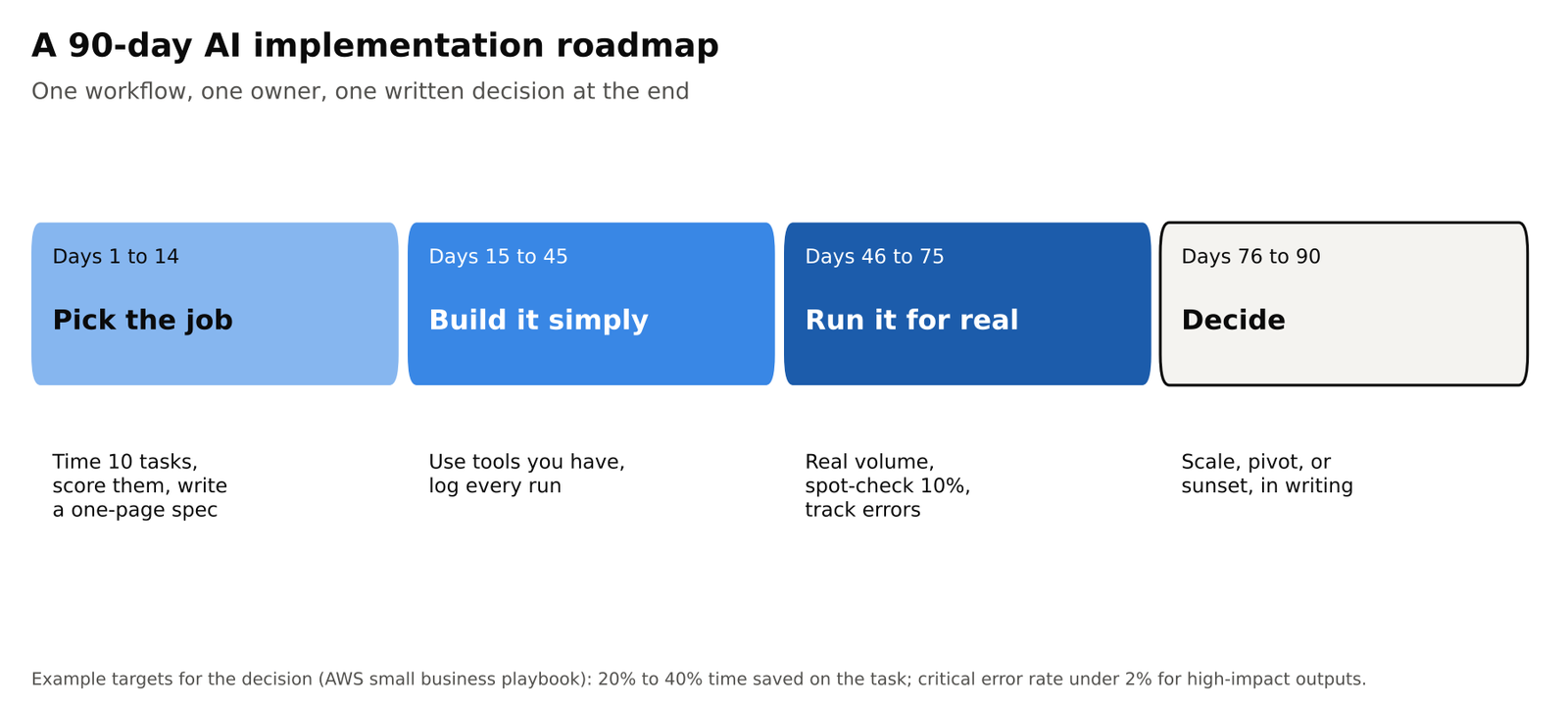
Days 1 to 14: pick the job. Time ten repetitive tasks for one real week. Don’t guess. Score them using the five-signal scorecard and pick one. On a single page, write down what triggers the task, the input, the output, where a person checks it, today’s baseline, and what success looks like. Clean up access permissions on the data it will touch. Name an owner who feels the pain today. If it doesn’t fit on one page, you’ve picked three projects and called them one.
Days 15 to 45: build the simple version. Use tools you already have, plus one automation tool. Log every run: input, output, whether a person edited it, minutes saved. Meet twice a week for 20 minutes on what broke. Don’t add a second workflow. Scope creep in week three is how both projects end up 80% done.
Days 46 to 75: run it for real. Put it on real volume, not the demo examples. Spot-check 10% of outputs. Write the misses into the AI’s instructions. Train the person who covers when the owner is out. Start a simple dashboard: volume, hours saved, error rate, cost.
Days 76 to 90: decide in writing.
| Decision | When |
|---|---|
| Scale | You hit the threshold, the error rate is acceptable, the owner wants more, and the cost is within budget |
| Pivot | Useful, but the plan was wrong: wrong channel, wrong checklist, wrong review point |
| Sunset | No time saved, quality worse than before, or the underlying process was the real problem |
Most pilots that go nowhere were never declared dead and never declared done. Only after day 90 do you pick project two, using the same automation tool and the same logging habit.
Get your team on board
The SBA Office of Advocacy found that about half of small firms using AI made no related investment in training, equipment, or process changes. Training doesn’t have to be a course. It has to be tied to the live workflow:
- Show, don’t announce. Demo the first workflow on real work from last week, not a vendor video. In my client work, skeptical teams move because of a mockup of their own workflow, a result on a low-risk job, or a competitor already doing it. Not a webinar.
- Train the reviewer, not just the user. The person who checks AI output needs to know what a wrong answer looks like.
- Write down the edits. Every correction a person makes goes into the AI’s instructions, so the same mistake doesn’t come back.
- Say what isn’t changing. If no one’s job is being cut, say so plainly. If roles are changing, say how.
From my client work
Start even smaller in week one with data capture, so the team feels a win before you touch paid ads or SEO work. A small business can move faster than an enterprise for a boring reason: fewer committees, fewer sacred systems, and one owner in the room. Don’t copy a six-month enterprise vendor evaluation. Heavy builds (a dozen stages, dozens of specialized agents, several reviewers, hundreds of client-specific rules) come after the first workflow is logged and boring. Pick the process that eats the most hours or the most money. Then the top three in one department. Not twelve experiments.
AI acceptable use policy template for small businesses
A 20-person business doesn’t need an AI committee. It needs one page. Copy this AI acceptable use policy and adjust it for your business:
- Keep sensitive data out of consumer chatbots. Customer data, unpublished creative, unreleased pricing, and HR files only go into a business plan (such as Claude Team or ChatGPT Business) where you’ve confirmed the vendor doesn’t train on your data and the retention settings fit your needs, or into an approved vendor.
- Anything that leaves the building has a named human reviewer. The reviewer is responsible, not the AI.
- Approved tools only. Tools people adopted on their own get 30 days to be approved or removed.
- No client material goes into AI model training unless the contract says so.
- If the AI can’t cite a source for a fact about our business, the answer is “I’ll check.”
- Tell people when they’re talking to a bot, and keep a person on decisions that affect a customer, an employee, or money.
Keep a test set. Save twenty real examples along with the answer you’d accept. Run them whenever you change AI models or instructions. That’s the entire quality-control program a small business needs in year one.
Questions to ask every AI vendor: Where is our data stored? Do you train your models on it? How long do you keep what we type in? Can we export the logs? If they can’t answer in writing, they aren’t your vendor.
Know the rules that apply to you. If you sell into the EU or handle EU residents’ personal data, take the EU AI Act and GDPR seriously even if you’re small. In the U.S., existing rules on advertising claims, employment, health, finance, and children’s data still apply to what AI produces. “The AI wrote it” is not a defense.
Bluevine’s 2026 study found data security and privacy is the top barrier to deeper AI use, at 33% (up from 23% a year earlier), with distrust of accuracy close behind at 31%. A short written policy takes that objection off the table with your own staff.
From my client work
Clients do ask about privacy, AI training on their data, disclosure, and approved tools. Put the answers in your agreement before they ask in the middle of a crisis. In practice, the top three concerns are compliance, security, and data safety.
Watch for tool sprawl. Every new tool should answer two questions: which system does it save its work back into, and which existing tool does it replace? If the answer to the second is “none,” it waits. A business already on Google Workspace or Microsoft 365 doesn’t need another writing assistant or a third meeting-notes app. Treat curation as a standing job: one person decides which tool owns which task, instead of every department buying its own.
How to measure AI ROI in a small business
Measure four things: hours returned, cost per task, error rate, and turnaround time. Don’t report how many prompts people ran. Don’t report that you’re an “AI-powered organization.”
Do the math before you buy. Monthly value = hours saved per week × your hourly cost × 4.33 weeks. Subtract what you pay for the tools. Your hourly cost should include benefits and overhead, not just wages.
Here is that math with an example rate of $45 an hour and two example tool budgets (the starter setup is about $60 to $100 a month):
| Hours saved per week | Value per month | Net, with $100/month in tools | Net, with $150/month in tools |
|---|---|---|---|
| 2 hours | $390 | $290 | $240 |
| 4 hours | $779 | $679 | $629 |
| 6 hours | $1,169 | $1,069 | $1,019 |
| 10 hours | $1,948 | $1,848 | $1,798 |
Example only. Replace $45 with your own hourly cost and use your actual invoices.
At these example numbers, a starter setup that honestly saves two hours a week already pays for itself. For a small business, hours are the profit-and-loss statement.
Time savings are well documented. An OpenAI study with Enterprise Nation found UK SMEs using AI save about 5.2 hours a week, and Bluevine found 48% of SMBs using AI save four or more hours a week. Revenue gains are reported far less often:
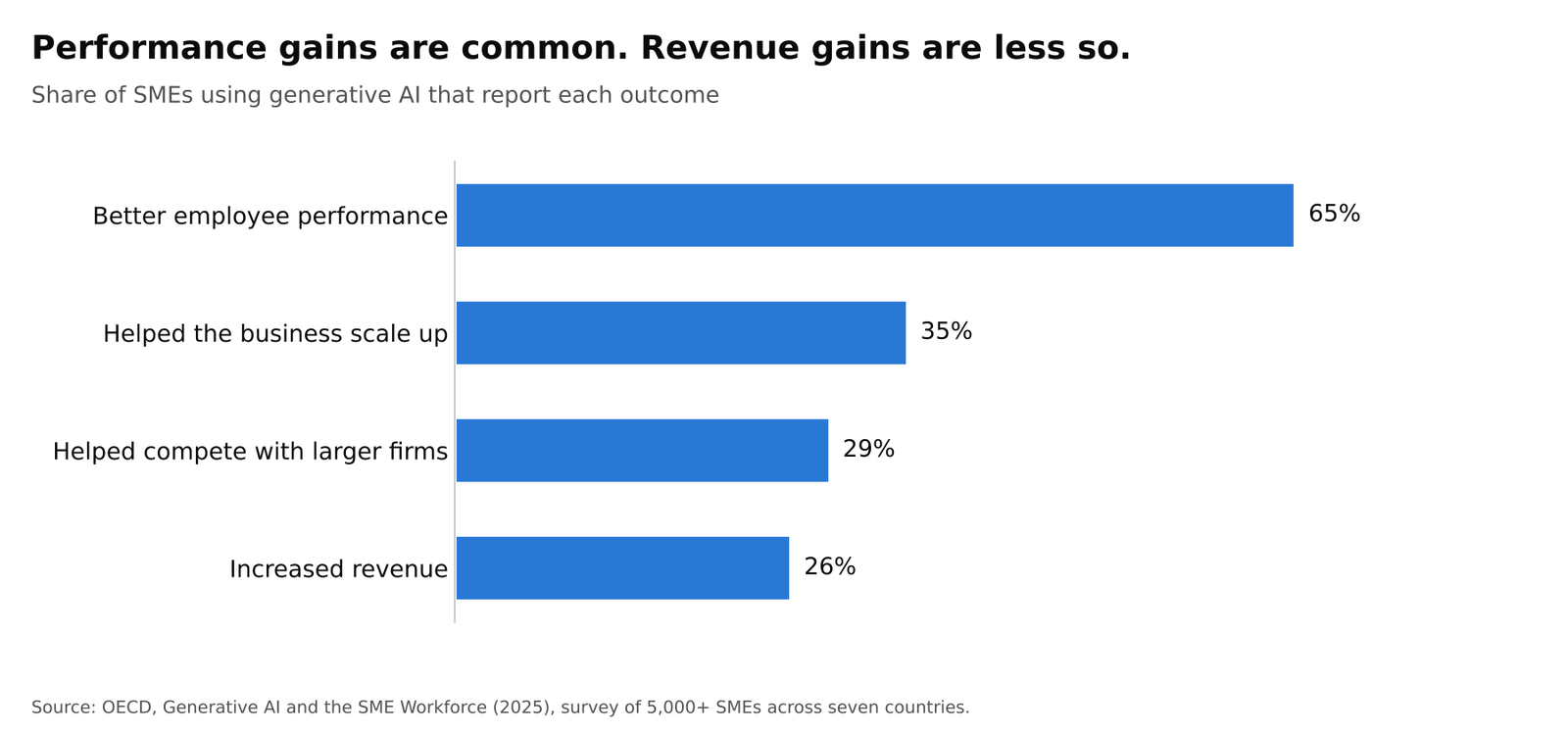
In the OECD’s 2026 Empowering SMEs in the Age of AI survey, only 21% of SMEs called the impact significant or transformational, and about three-quarters of AI users were still “novices” using off-the-shelf tools on isolated tasks. Build your business case on hours and performance. Treat revenue as a possible later effect.
From my client work
In my client work, hours come back first in assembling reports, research briefs, quality checks, producing ad variations, and first-draft proposals. The real conversation with an owner is which part of the business you’re trying to improve. Billable capacity means automating data capture, assembly, and reporting. Win rate means faster first responses and faster access to past work. “Looking modern” means wait. If you hire help, pay for the review, the system, and the accountability, not hours of AI generation. Quality holds when the review is senior, not when the most junior person “just sends what the AI wrote.”
Why AI projects fail in small businesses
The common reasons are dull:
- No baseline. Nobody timed the old way, so “it feels faster” is the whole evaluation.
- Automating a mess. The form is broken, the CRM is a junk drawer, the brand voice lives in a Slack thread. AI makes the mess bigger.
- No owner. A committee bought licenses. Licenses don’t run workflows.
- No review step. The first wrong email to a customer ends the program.
- Collecting tools. Four AI assistants and no record of what any of them did.
- Asking AI to fix a broken business.
A Harvard Business School field experiment with entrepreneurs in Kenya is the clearest warning on point 6. An AI business mentor helped already-strong businesses and hurt struggling ones. Don’t ask AI to invent a strategy for a business whose basics are broken. Use it to draft, extract, create variations, and find information.
From my client work
The failures I’ve seen in practice are quieter than the horror stories. No wiped datasets, no agent emailing a client list. Instead: occasional bad outputs, a connected app or AI model going down, and runaway costs when an automation keeps retrying. What contains that is redundant quality checks, a backup AI model so one outage doesn’t stop the job, and planning for downtime as a normal state. The failure worth warning an owner about is launching a workflow with one AI model and no log. That’s how you lose a week and decide AI is useless.
Free templates
Copy these into a doc or spreadsheet. They’re the minimum paperwork that keeps a pilot honest.
1. Workflow spec (one page, written on days 1 to 14)
| Field | Your answer |
|---|---|
| Workflow name | |
| Owner | |
| Trigger (what starts it) | |
| Input | |
| Output | |
| Human review point | |
| What must never send automatically | |
| Baseline (time and cost today) | |
| Day-90 success threshold | |
| Kill criteria | |
| Approved tools | |
| Data that must not leave the building |
2. Weekly run log
| Date | Run | Input | Output | Edited? (Y/N) | Minutes saved | Error type |
|---|---|---|---|---|---|---|
3. Day-90 decision memo
- Decision: Scale, pivot, or sunset
- The threshold we set on day 14:
- What four weeks of real use showed:
- What we’ll stop doing if we scale:
Frequently asked questions about AI for small business
How can AI help my small business?
- AI helps most with repetitive work: drafting emails and posts, summarizing competitor news, sorting leads and the inbox, building the weekly report, and pulling data off invoices.
- A person still reviews the output.
- The payoff is hours back each week, not a new business model.
- See how AI helps a small business.
How do I implement AI in my small business?
- Pick one repetitive, low-risk task, name an owner, and time how long it takes today.
- Build a simple version with tools you already pay for plus one automation tool, and run it on real work.
- Decide in writing on day 90 whether to scale, change, or stop it.
- See the 90-day roadmap.
What is the best AI tool for a small business?
- Start with the AI inside software you already use: Copilot in Microsoft 365 or Gemini in Google Workspace.
- Add one standalone assistant (I recommend Claude for most small businesses) and one automation tool such as Zapier or Make.
- Choose by the workflow you’re automating, not the brand.
- See which AI tools to start with.
How much does AI cost a small business?
- About $60 to $100 a month at today’s list prices for a starter setup, before any Microsoft 365 Copilot add-on.
- That covers two or three AI assistant seats at about $20 to $25 each, plus an automation tool from about $20 a month.
- Outside help costs more; one agency quotes $5,000 to $25,000 for 3 to 8 workflows.
- See AI costs.
Is hiring an AI consultant worth it for a small business?
- Yes, when the workflow touches customers, money, or sensitive data.
- Yes, when your systems don’t connect without custom work, or nobody inside has a few hours a week to own it.
- For internal drafts, summaries, and reports, most small businesses can start on their own.
- See should you hire an AI consultant.
How many businesses use AI?
- About 1 in 5 U.S. firms used AI in a business function in the past two weeks, according to Census Bureau data from December 2025 to May 2026.
- Owner surveys report 58% to 77%, because they count any use, including chatbots.
- See the 2026 data.
How do AI agents help small businesses?
- An AI agent takes a series of steps on its own, such as reading an email, looking up the customer, and drafting a reply for a person to approve.
- Agents help most once a workflow is already running and logged, not as a first project.
- See do you need AI agents.
Can AI run my business?
- No. AI works best on repetitive, well-defined tasks with a person reviewing the output.
- A Harvard Business School field experiment found AI business advice helped strong businesses and hurt struggling ones.
- Use AI to draft, sort, and find information, not to set your strategy.
- See why AI projects fail.
About the author
Marc Beharry is a digital marketing and analytics strategist with more than 20 years of experience in SEO, paid search, and web analytics. He has worked with agencies and consultancies including Saatchi & Saatchi Wellness, Omnicom, Accenture, and ConsenSys, and currently builds AI-assisted analytics, SEO, and paid media workflows for clients. The “From my client work” notes in this guide come from that practice, with client details removed.
Want help putting this roadmap to work?
Tell me about the first workflow you’re thinking of automating, and I’ll tell you how I’d approach it.
Sources
Adoption and impact data
- U.S. Census Bureau: AI use at U.S. businesses (BTOS), May 2026
- LendingTree: Census BTOS AI use by firm size
- Eurostat: Use of artificial intelligence in enterprises
- U.S. Chamber of Commerce: Empowering Small Business report, 2025
- Intuit: 2026 AI Impact Report
- Bluevine: 2026 Small Business AI Trends Report
- Enterprise Nation and OpenAI: UK SMEs save over half a day a week with AI
- OECD: Generative AI and the SME Workforce
- OECD: Empowering SMEs in the Age of AI (2026 D4SME Survey)
- SBA Office of Advocacy: AI in Business, Small Firms Closing In (PDF)
- McKinsey: The State of AI
Playbooks, pricing, and research
- AWS: Practical AI for small business operations
- ChatGPT Business pricing
- Claude pricing
- Microsoft 365 Copilot Business pricing
- Zapier pricing
- DK Studio: AI automation services and pricing
- Harvard Business School: The Uneven Impact of Generative AI on Entrepreneurial Performance
Case studies
- Klaviyo: Ministry of Supply predictive analytics case study
- Hookd: AI ads case studies (FULLBEAUTY Brands)
- Admove: Monolith KLH customer story
- Akkio: LA/VIE custom ad creative predictive model
- Forbes Agency Council: How 16 agencies are using AI to optimize ad campaigns
- StrataBlue: Kayak Pools Midwest case study (PDF)
- d2b: Agency operations AI orchestration case study
- Microsoft: Small and medium businesses aren’t waiting for an AI invitation
- Vic.ai: Countsy case study



Comments are closed